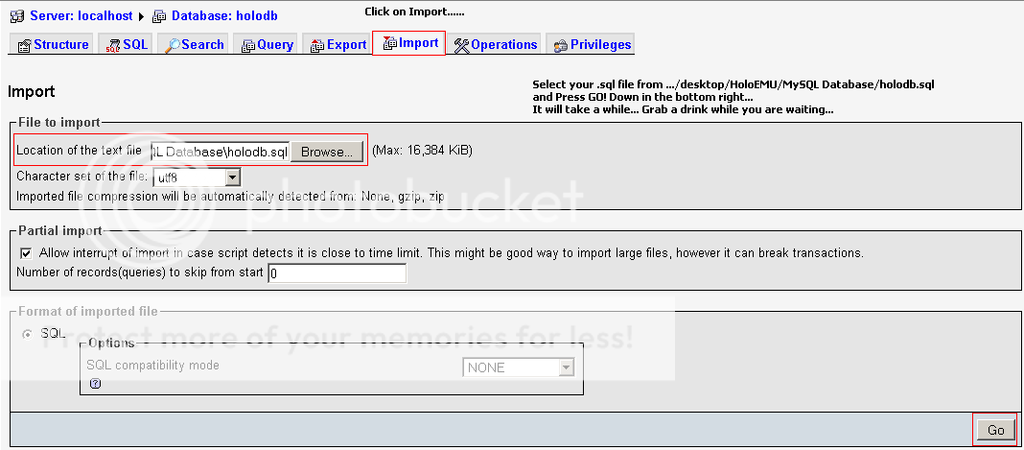
9. Drücke auf ( Import ) (DRÜCKE AUF Browse...) …/Desktop/v26_Holograph_Emulator/holodb.sql
Database Host: localhost Username: root Password: ( DEIN PASSWORT WIE BEI Nr.4/Nr.7 ) Database Name: holodb Full site path: http:// Deine No-IP Adresse oder deine IP
11. Drücke auf Submit und fülle es aus. LÖSCHE install.php UND upgrade.php bei C:xampphtdocs und Lade die Seite neu. Dann siehst du dein Hotel.
14. Geh jetzt bei .../Desktop/v26_Holgraph_Emulator/bin/Debug/bin/mysql.ini
Host=localhost port=3306 database=holodb username=root password=DEIN PASSWORT WIE BEI Nr.4/Nr.7 Speichere und Schließe.
15. Jetzt geh bei …/Desktop/v26_Holograph_Emulator/Holograph Emulator.csproj Und drücke F5 jetzt kommt eine Schwartze BOX und es müsste alles mit Grüner schrift weiter laufen.
16. Fertig - Hotel Online
17. Anmerkung: Du kannst den Holograph Emulator und das HoloCMS durch andere Versionen ersetzen.